Playbook · Outbound email
Outbound Email Automation: What to Automate and What to Leave Alone
 By Marián Cabadaj · Published 3 September 2026 · 20 min read
Outbound email automation is software doing the repeatable parts of cold outreach: choosing which accounts are worth approaching, finding and verifying the person, sending a sequence, spacing the follow-ups, stopping on a reply, and writing the whole thing back to the CRM. The parts it should not do are the offer and the answer.
Almost every team I have watched build this gets the split backwards. They automate the sending, because sending is the visible work, and they leave the targeting to a rep with a spreadsheet. That produces a large volume of well-timed messages to people who were never going to buy, which is the exact recipe for the spam complaints that end a sending domain.
This guide breaks the motion into ten steps and gives a verdict on each: automate, assist, or keep human. Then it covers why sequences stop landing, what Gmail and Outlook now require of anyone sending at volume, what the law actually says, the four numbers worth watching, and the order to build the whole thing in. Every requirement and figure comes from Google, Microsoft, the FTC, Salesforce or The Bridge Group directly, cited where it appears.
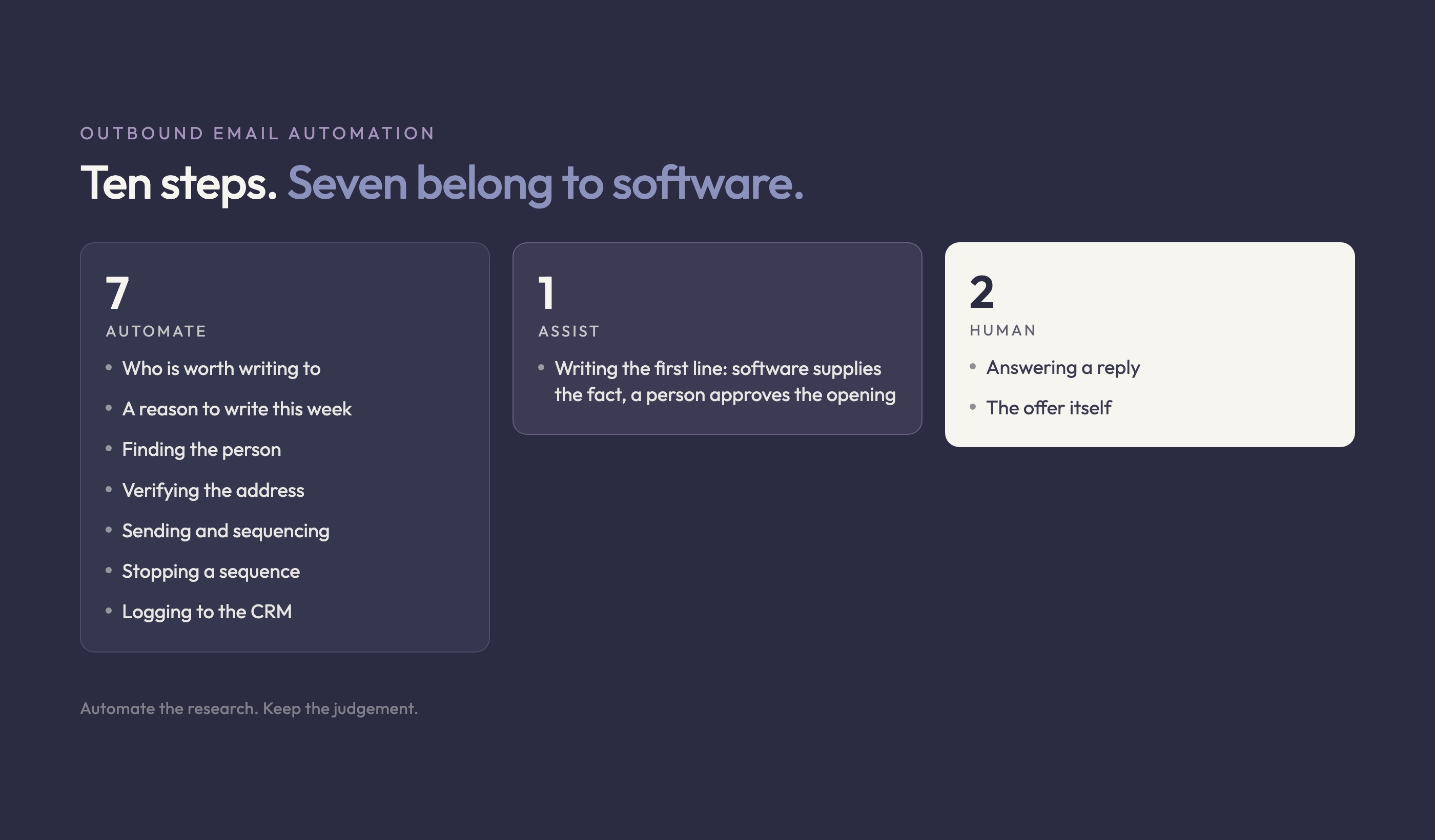
What is outbound email automation, and what is it not?
Outbound email automation is the use of software to run a cold email motion end to end, from picking the account to logging the reply. The word doing the work in that sentence is outbound. The recipient never asked to hear from you. That single fact separates this from marketing email, and it changes every design decision downstream.
Why the consent difference decides the design
A marketing list has permission, so the hard problems are segmentation and timing. An outbound list has no permission, so the hard problem is earning attention you were not granted. That means the targeting has to be sharper, the daily volume lower, the suppression rules stricter, and the complaint rate watched daily rather than reviewed at the end of the quarter. A tool built for the first job will happily do the second one badly, and most of them are built for the first job. The two lists also arrive through different motions entirely, which our guide to inbound sales covers from the inbound side of that same divide.
Two different things get called automation
When a vendor says automation, they usually mean sequencing: send, wait three days, send again, stop on reply. That is the easy half and it has been solved for a decade. The half that decides whether any of it works is deciding who goes into the sequence, and at most companies that is still a person with a filtered spreadsheet. Our guide to automated sales runs the same split across the whole sales process rather than just the email step, and the conclusion is the same in every stage: automate the research, keep the judgement. Which stage is even ready to be automated is the question our guide to sales process optimization answers first. Where that research has no fixed path, the tool is an agent rather than a sequence, and our guide to AI agents for sales covers which steps that actually applies to.
Which of the ten steps should you actually automate?
Break the motion into steps and the answer stops being a matter of taste. A step is safe to automate when you can write the rule down. If you cannot state the rule, a tool will not discover it for you, it will apply your vagueness at scale and hand you the invoice.
| Step | Verdict | Why |
|---|---|---|
| Deciding who is worth writing to | Automate | A rule you can state is a rule software can apply, at a volume no rep can match. |
| Spotting a reason to write this week | Automate | Hiring posts, funding rounds, new ad creative and public complaints are all machine readable. |
| Finding the person behind the account | Automate | Title and seniority matching is deterministic once the ICP is written down. |
| Verifying the address | Automate | Never skip it. An unverified list is the fastest route to a bounce rate that costs you the domain. |
| Writing the first line | Assist | Software supplies the fact. A person decides whether the fact is worth opening with. |
| Sending and sequencing | Automate | Timing, throttling and follow-up spacing are exactly what software is for. |
| Stopping a sequence | Automate | On reply, on bounce, on unsubscribe, on a second contact at the same account. All rules. |
| Answering a reply | Human | The reply is the moment the prospect is paying attention. Spending it on a template wastes the only expensive thing you earned. |
| The offer itself | Human | No tool knows what you can credibly promise. A wrong offer scales into a wrong offer. |
| Logging activity to the CRM | Automate | Manual logging is the first thing a busy rep drops, and the first thing a forecast needs. |
"Sending and sequencing" is also where follow-up cadence lives. Our guide to cold email follow-ups covers how many touches to send and how far apart to space them, since that step is where most of a sequence's replies actually come from.
Verification is the step nobody wants to pay for
Of the seven steps marked automate, address verification is the one teams cut when a quarter is tight, and it is the one that costs the most to cut. A bounce is not a wasted send. It is a signal to the receiving provider that you are mailing a list you did not build carefully, and that signal attaches to your domain rather than to the campaign. The campaign ends in a month. The domain is yours for years.
Field note: the first time I saw a domain go quiet, we spent two weeks rewriting subject lines. The bounce rate had been climbing for a month because someone had turned verification off to save credits before quarter end. Nothing in the sequencing tool said a word about it.
What has to stay human, no matter the tool?
Three things, and they are the three that teams automate first, because they are the three that feel like writing.
The offer
No tool knows what your company can credibly promise, which means no tool can tell you that your offer is the reason nobody replies. Automating a weak offer produces a larger quantity of the same silence. In practice I want ten manual sends and an honest read of what came back before anything goes into a sequence that sends a thousand. Our guide to cold email templates covers the structure worth testing those ten sends against.
The reply
A reply is the most expensive thing an outbound motion produces. Answering it with a template spends that on the cheapest possible response. If reply volume is high enough that templating starts to feel necessary, the real constraint is reply capacity, and the correct move is to send less and target better rather than to answer worse.
The judgement inside personalisation
Automate the research, keep the judgement. Software can tell you an account posted three sales roles last month. Whether that is a reason for this particular person to reply is a call, and it is the call that decides whether a first line reads as researched or as generated. Have the tool supply the fact and have a person approve the opening.
Why do automated sequences stop landing?
Because reputation, not volume, is the lever, and reputation is the one input a sequencing tool does not manage for you. Teams notice the symptom late: reply rates fall, so the copy gets rewritten, so nothing improves, because a filtered message does not have a copy problem.
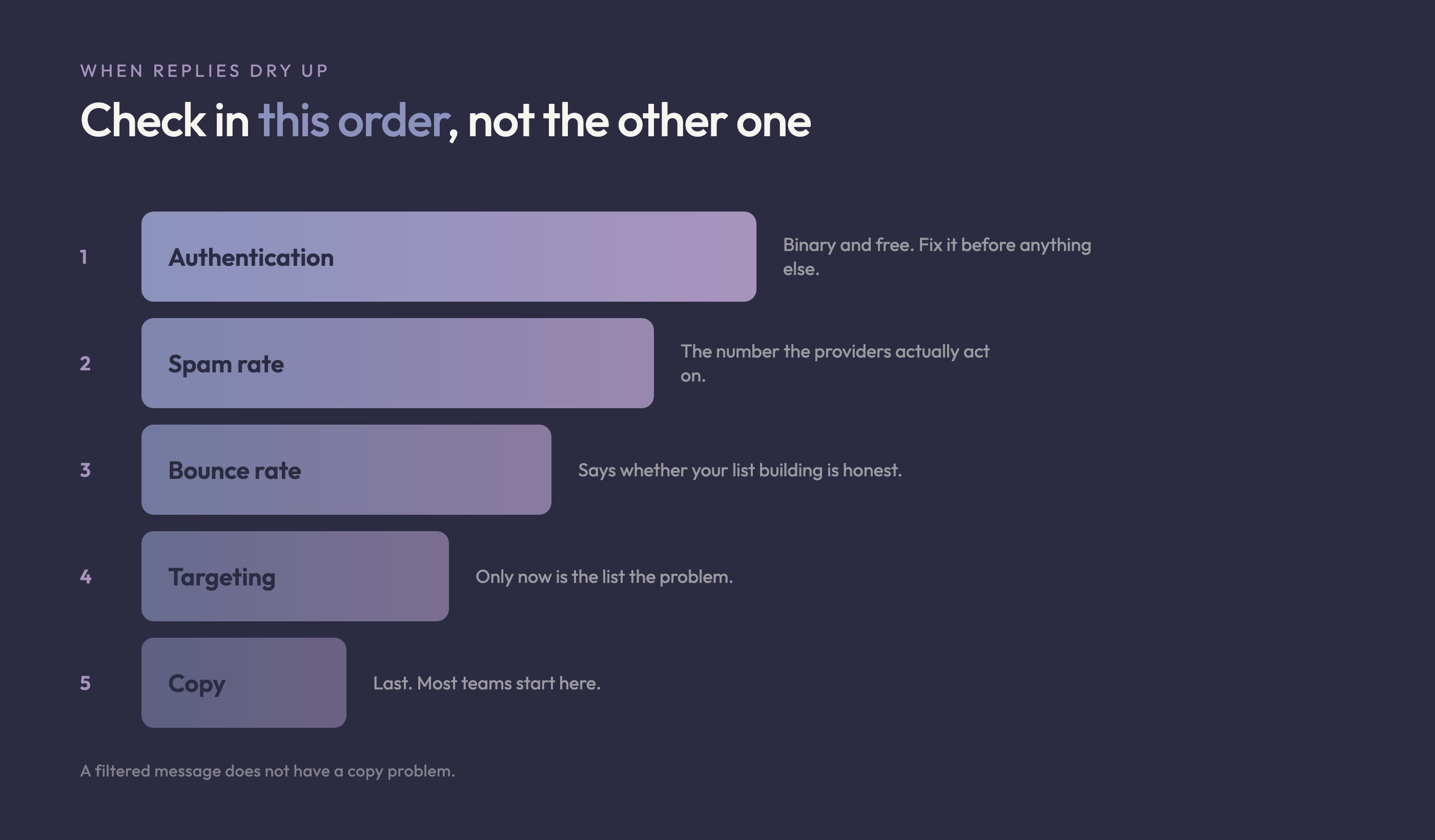
Check in this order, not the other one
Authentication first, because it is binary and it is free. Then the complaint rate, because it is the number the providers actually act on. Then the bounce rate, because it says whether your list building is honest. Only then the targeting, and only after that the copy. Most teams run that list in reverse and spend a month on subject lines while the domain burns. When you do get to copy, our guide to cold email subject lines covers what the data actually shows moves the open rate.
Volume is a consequence, not a setting
Daily volume should fall out of two things: how many replies you can genuinely answer well, and what your complaint rate is doing this week. A number typed into a tool because it felt ambitious is how a domain gets filtered. Our guide to automated sales prospecting walks the five failure modes that follow, in the order they arrive. If you want more meetings, the honest lever is a better list, not a bigger one.
What do Gmail and Outlook now require of you?
Both providers have moved authentication from best practice to entry requirement, and both drew the line in the same place. Google publishes email sender guidelines defining a bulk sender as anyone sending more than 5,000 messages a day to Gmail accounts, in force since 1 February 2024. Microsoft followed with requirements for high volume senders that took effect on 5 May 2025, using the same 5,000 a day threshold. Our guide to cold email deliverability covers the same rules as a shorter, standalone checklist.
What this means for a B2B sales team: 5,000 a day is easy to cross by accident once you are running several domains and several reps. Treat the threshold as the point where DNS work stops being optional, and do that work before you are near it rather than after delivery drops.
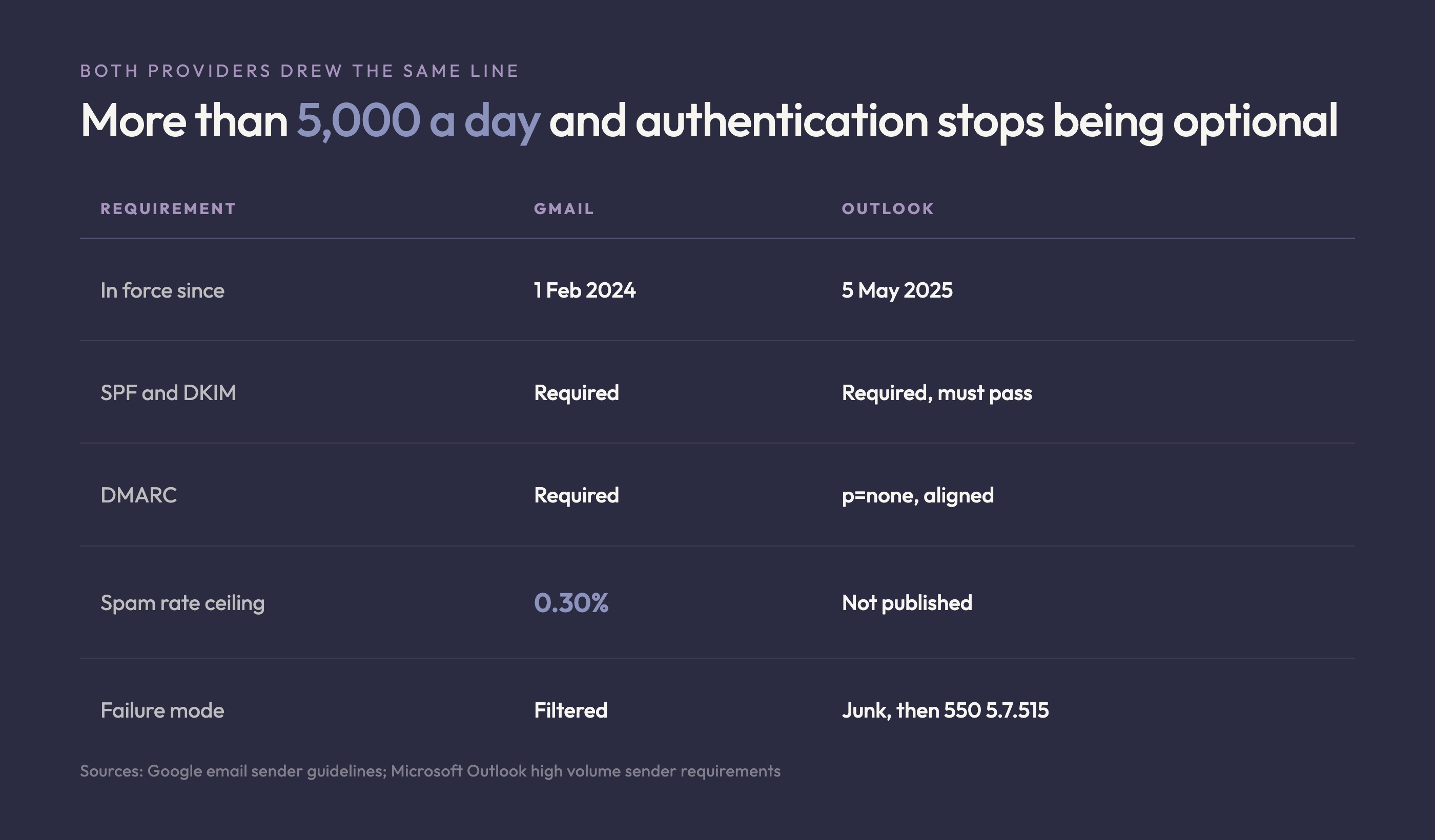
| Requirement | Gmail | Outlook |
|---|---|---|
| When the rules apply | More than 5,000 messages a day to Gmail accounts, since 1 February 2024 | More than 5,000 emails a day, since 5 May 2025 |
| SPF | Required | Required, and it must pass |
| DKIM | Required | Required, and it must sign for the domain |
| DMARC | Required on the sending domain | Required at p=none or stricter, aligned with SPF or DKIM |
| One-click unsubscribe | Required for marketing and subscribed mail, with a visible link in the body | Expected as a functional unsubscribe |
| Spam rate ceiling | Below 0.30% in Postmaster Tools, and Google advises staying below 0.10% | No published figure. List hygiene and bounce management are named instead |
| What failure looks like | Mail is filtered, and mitigation needs 7 consecutive days below 0.30% | Routed to Junk first, then rejected with 550 5.7.515 |
The number to write on the wall
Google asks bulk senders to keep the spam rate reported in Postmaster Tools below 0.30%, and recommends staying below 0.10%. Read those two figures as a limit and a target, not as a range. Google also states that mitigation requires seven consecutive days back under the threshold.
What this means for a B2B sales team: a bad week costs you the following one too, so the spam rate is not a monthly review item. Someone has to own it daily, and that someone is usually nobody.
What failure actually looks like on Outlook
Microsoft's enforcement has two stages and the first one is quiet. Non-compliant high volume mail is routed to Junk, which looks like a sudden drop in replies rather than an error. Only later does it become an outright rejection carrying 550 5.7.515 Access denied.
What this means for a B2B sales team: if your Outlook reply rate fell off a cliff and nothing bounced, check DMARC alignment before you check anything else. A silent Junk routing looks exactly like bad copy, and it is not.
What does the law actually require?
Less than most people fear in the United States, and more than most people expect everywhere else. The FTC's CAN-SPAM compliance guide does not require prior consent for a commercial email. What it requires is a working exit.
- Honour an opt-out within 10 business days. That is the ceiling, not the target. Automate it and it is instant.
- Keep the opt-out mechanism alive for at least 30 days after the message went out. A link that dies with the campaign is a violation.
- Ask for nothing beyond an email address. You cannot charge a fee, demand extra identifying information, or make someone do more than reply or visit a single page.
- Stop selling or transferring the address once someone has opted out, including as part of a list.
What this means for a B2B sales team: the 10 business day ceiling is a trap if suppression is manual, because a re-import quietly resets it. One suppression list, shared across every tool, is the only version of this that survives a busy quarter.
The FTC prices each violating message at up to $53,088. That is per email, not per campaign.
What this means for a B2B sales team: a single bad re-import of an opted-out list costs a five-figure number multiplied by the size of the list. Suppression is the least glamorous and most load-bearing thing in the stack.
Note also that the European Union and Canada build their regimes on consent rather than on opt-out, so a list that is lawful to mail into the United States is not automatically lawful elsewhere. Check the regime of the country you are sending into.
Which numbers tell you it is working?
Four, and one of them is not a performance metric at all.
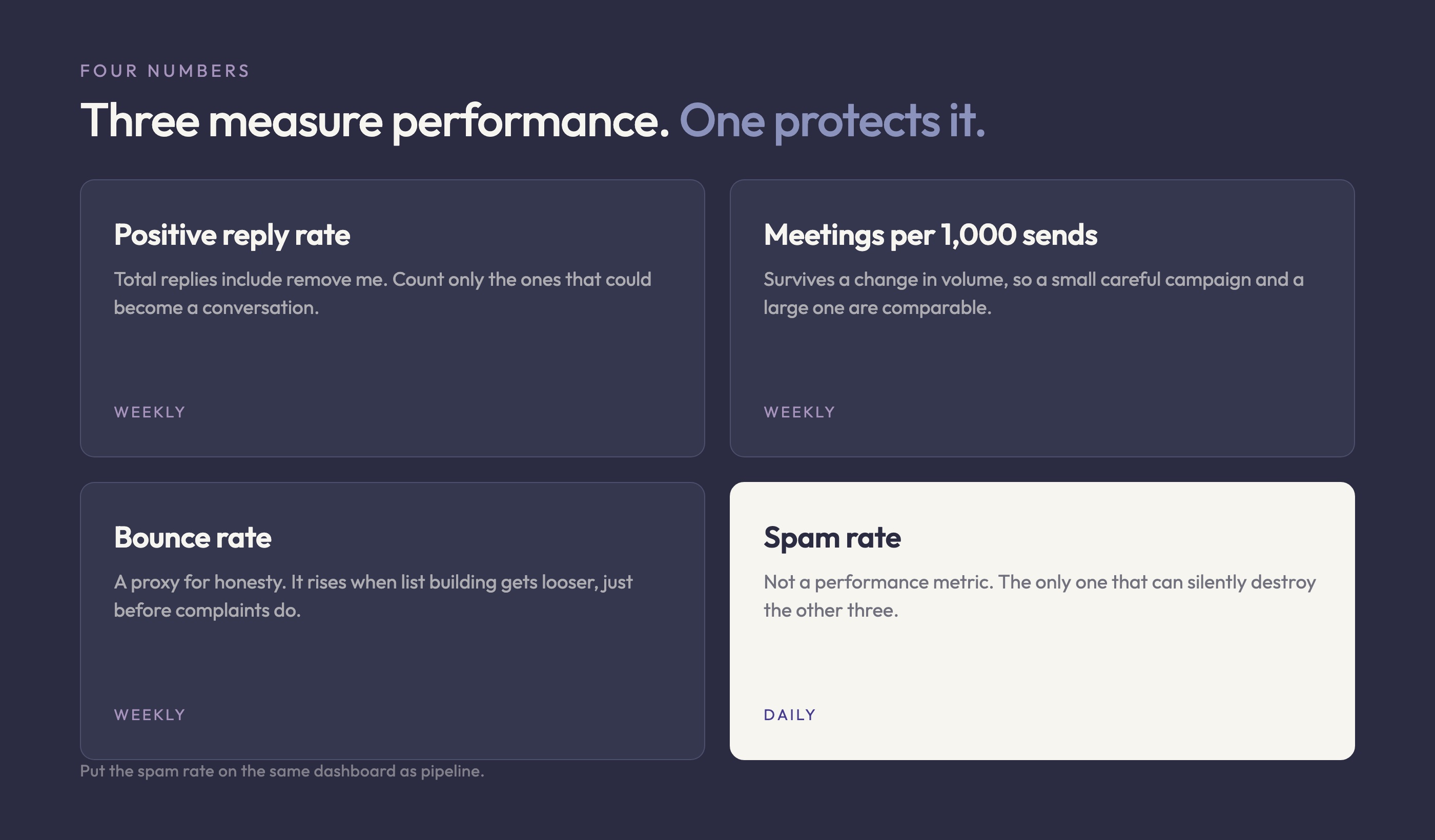
Positive reply rate, not reply rate
Total replies include "no thanks" and "remove me", and a sequence can raise total replies by annoying more people. Count only replies that could become a conversation. It is a smaller number and it moves in the same direction as revenue.
Meetings per thousand sends
This is the honest unit of outbound efficiency, because it survives a change in volume. Reply rate flatters a small careful campaign and punishes a large one. Meetings per thousand sends lets you compare the two, which is what you need when you are deciding whether to scale.
Spam rate, checked daily
The metric that is not about performance. It is the only one that can silently destroy the others, and it is the one nobody owns. Put it on the same dashboard as pipeline.
Bounce rate, as a proxy for honesty
A rising bounce rate almost always means the list building got looser, usually because a target went up. It is an early warning for the complaint rate that follows it by a week or two.
For team-level benchmarks on activity, quota and ramp, The Bridge Group's 2025 SDR Models, Motions and Metrics report surveys more than 350 B2B companies and is the standing reference in this category.
What this means for a B2B sales team: use it for structural questions like ramp time and quota, not for cold email conversion. We publish no stage-by-stage cold email benchmark here, because no primary dataset we would cite publishes one and the aggregator posts that do disagree with each other. Measure your own baseline for a month and compare against that. Our guide to the SDR role covers what those team benchmarks mean in practice.
How much of the week does this actually give back?
Enough to be the point of the exercise. Salesforce's State of Sales 2026, its seventh edition, surveyed 4,050 sales professionals and found the average seller spends 40% of their time actually selling. Of the rest, 16% goes on prospecting and 17% on manually entering data.
What this means for a B2B sales team: the two biggest non-selling blocks in that breakdown, prospecting research and data entry, are both on the automate side of the table above. That is where the hours are, not in writing faster.
The same study found that sellers expect fully implemented AI agents to cut prospect research time by 34% and email drafting by 36%.
What this means for a B2B sales team: note which of those two is larger in absolute terms. Research is a bigger block than drafting, so automating research beats automating writing, which is the opposite of how most teams sequence their tooling purchases. If you are picking tools now, our side-by-side comparison of B2B sales tools covers which layer of the stack each vendor actually replaces.
Field note: the clearest win I have seen from this was not more sends. It was a rep going from four hours of list building a week to twenty minutes of approving openings, and spending the difference on the replies they already had. Pipeline moved. Volume did not.
What order should you build it in?
The order is the whole trick, because each step makes the next one measurable. Teams that start in the middle end up unable to tell which change did what.
1. Authentication, before a single send
SPF, DKIM and DMARC on the sending domain. It is a morning of DNS work and it is now a condition of delivery at both major providers rather than a nice-to-have.
2. Suppression, before volume
One suppression list across every tool and every sequence. Opt-outs, bounces, current customers, open opportunities, and anyone a colleague is already talking to. Boring to build, expensive to lack.
3. Targeting, before copy
Write the ICP down as rules a machine can apply, then apply them. If the rules cannot be written, the list is a matter of opinion, and no amount of sequencing fixes a list that is a matter of opinion.
4. Copy, then volume, last
Only now does rewriting the email pay, and only once the copy is stable does raising volume tell you anything. Longer sales cycles change how patient you have to be with this loop, which our guide to SaaS software sales walks through stage by stage.
The same automate-or-keep-human split applies past the inbox. Our guide to ethical LinkedIn outreach covers where that line sits on a platform whose own terms name automated sending as the one thing not to hand off.
The ten steps at a glance
The same ten steps with what each one costs to set up, what it needs, and what you get back. Verdicts repeat from the table above so this stands alone if it is the only part you read.
| Step | Verdict | Implementation complexity | What it needs | What you get |
|---|---|---|---|---|
| Deciding who is worth writing to | Automate | Moderate: the ICP has to be written as rules before anything can apply it | A written ICP, firmographic data, a scoring model | A shorter list, a lower complaint rate, and every downstream number improves |
| Spotting a reason to write this week | Automate | Moderate to high: needs a source per signal type and a freshness window | Signal sources, a relevance score, a decay rule | Timing. The same message lands differently in the week the trigger fired |
| Finding the person behind the account | Automate | Low: this is a solved lookup | A contact data provider, title and seniority rules | The right inbox instead of the reachable one |
| Verifying the address | Automate | Low: one API call per address | A verification service and the discipline to drop what fails | A bounce rate that does not tell providers you built the list carelessly |
| Writing the first line | Assist | Moderate: the approval step is a workflow, not a setting | The signal in the rep view, plus a fast approve or reject | An opening that reads as researched rather than generated |
| Sending and sequencing | Automate | Low: this is what every sequencer already does | A sending tool, warmed domains, a daily cap | Consistent follow-up, which is where most replies actually come from |
| Stopping a sequence | Automate | Low to moderate: one suppression list across every tool is the hard part | A shared suppression list and webhooks from the inbox | Nobody gets a follow-up after they answered, which is the most common own goal |
| Answering a reply | Human | Not applicable: the point is that a person does it | Reply capacity, which is the real cap on daily volume | The conversation. This is the whole output of the motion |
| The offer itself | Human | Not applicable: this is positioning work | Ten manual sends and an honest read of what came back | The one variable that changes reply rate more than any subject line |
| Logging activity to the CRM | Automate | Low: a native integration or a webhook | CRM write access and an agreed activity schema | A forecast built on what happened rather than on what got typed up |
How Leadalf runs outbound email automation
Knowing the split is not the hard part. Most teams already accept that targeting matters more than sequencing. The gap is operational: nobody has the hours to research a hundred accounts a week, so the list quietly becomes whatever was easy to export.
The differentiated point is this: in outbound email, the list is the targeting. There is no audience algorithm standing between you and the recipient, no auction deciding who sees the message. The only targeting that exists is the decision about who receives it, which means the list is the campaign. Every team that treats list building as prep work and sequencing as the real job has the hierarchy exactly inverted, and their complaint rate says so.
What the workflow looks like
Leadalf automates the half most teams still do by hand, and leaves the sequencing in the tool you already use.
- Signals in: it watches LinkedIn, Reddit, X, the Meta Ads Library and job postings for buying signals, so a list starts from something that happened rather than from a filter on company size.
- Scored against your ICP, not a keyword: each signal is scored against the ICP you wrote down, which is what stops a keyword match from becoming a send.
- Enriched, then delivered with the reason attached: the people behind the signals that pass are enriched and pushed into Instantly or HeyReach, carrying the reason they qualified.
The reason travelling with the lead is the part that matters for the table above. It is what a rep needs to approve an opening line without redoing the research, which is what keeps the one "assist" row from quietly becoming a "human" row that nobody has time for. See how the signal sourcing works end to end, or check what a filtered lead costs in credits.
It does not write your offer and it does not answer your replies. Those are the two rows the table marks human, and they stay that way on purpose.
FAQ
Is outbound email automation legal?
In the United States, yes, and CAN-SPAM does not require prior consent to send a commercial email. It does require you to honour an opt-out within 10 business days, to keep the opt-out mechanism working for at least 30 days after the message went out, and to stop selling or transferring that address once someone has opted out. The FTC prices each violating email at up to $53,088, so the opt-out plumbing is not the corner to cut. Rules in the European Union and Canada are built on consent instead, so a list that is lawful to mail in the United States is not automatically lawful elsewhere. Check the regime for the country you are sending into, not the one you are sending from.
How many emails a day can I send?
The number that matters is not a sending limit, it is the threshold where you start being judged as a bulk sender. Google sets that at more than 5,000 messages a day to Gmail accounts, and Microsoft sets it at more than 5,000 a day for Outlook. Below that, weak authentication is survivable. Above it, SPF, DKIM and DMARC are a condition of delivery rather than a best practice. Pick your daily volume from your reply capacity and your spam rate, never from a number typed into a tool.
Does automation itself hurt deliverability?
No. Sending to people who do not want to hear from you hurts deliverability, and automation makes that easy to do at scale. The mailbox providers do not measure whether a message was typed by a person. They measure whether recipients mark it as spam, whether the address existed, and whether the domain is authenticated. A tightly targeted automated sequence beats a loosely targeted manual one on all three.
Should I automate personalisation?
Automate the research, not the judgement. Software can reliably tell you that an account posted three sales roles last month or started running a new ad angle last week. What it cannot tell you is whether that fact is a reason for this person to reply. Have the tool supply the fact and have a person approve the opening line. That is the difference between a first line that reads as researched and one that reads as generated.
What should I fix first if replies have dried up?
Check the spam rate in Google Postmaster Tools before you touch the copy. Copy is what teams rewrite first because it is what they can see, but a filtered message does not have a copy problem, it has a reputation problem. If the spam rate is clean and the bounce rate is clean, then it is targeting, and only after that is it the writing.